Prenotazioni Cloud
  • Home
  • Why Choose Us
  • Services
    • Appointment Diary
    • Restaurant
    • Beauty Salon
    • Medical office
    • Sports Center
    • Events
  • Pricing
  • Resources
    • Info
    • Book a Demo
    • Docs
    • FAQ
    • Support
  • English
    • English
    • Italiano
Registrati ora
Hai qualche domanda?

+39 0818683364

Prenotazioni Cloud
  • Home
  • Why Choose Us
  • Services
    • Appointment Diary
    • Restaurant
    • Beauty Salon
    • Medical office
    • Sports Center
    • Events
  • Pricing
  • Resources
    • Info
    • Book a Demo
    • Docs
    • FAQ
    • Support
  • English
    • English
    • Italiano
Prenotazioni Cloud
  • Home
  • Why Choose Us
  • Services
    • Appointment Diary
    • Restaurant
    • Beauty Salon
    • Medical office
    • Sports Center
    • Events
  • Pricing
  • Resources
    • Info
    • Book a Demo
    • Docs
    • FAQ
    • Support
  • English
    • English
    • Italiano
Registrati ora
Hai qualche domanda?

+39 0818683364

Consigli e risposte dal team di Prenotazioni Cloud

Get Started

  • Create an Account
  • Personal Area

Customizable

  • Settings
  • Customization
  • What to Ask
  • Services
  • Gift Card

Reservations and Payments

  • Personal Organizer
  • Waiting List
  • Manage a reservation
  • Payments

Restaurant

  • Tables
  • Your Agenda
  • Extended Agenda

Beauty salon

  • Workstation
  • Your Agenda
  • Extended Agenda

Events

  • Event Management

Medical Office

  • Patient Registry
  • Room
  • Medical Diary
  • Extended Medical Agenda

Notifications

  • Onboarding
  • WhatsApp Notifications
View Categories
  • Home
  • Docs
  • Beauty salon
  • Your Agenda

Your Agenda

1 min read

// How to have everything you need just a click away

On this page we have all the information necessary to manage the reservations received or to enter new ones if the latter is not made directly by the customer via the portal but through other channels (for example via telephone).


New Reservation #

If a customer calls to avoid losing the reservation or at the same time check its feasibility, you can create it directly in this section. Just double click on the line corresponding to the chosen time.

Insert Reservation

You can choose a customer already present in your database by choosing “Customer” and selecting it from the drop-down window or by choosing “New Customer” and entering the relevant data:

  • Name
  • Surname
  • Email
  • Telephone

Another option could be that of the anonymous customer, in case all the customer’s information is not known or for any other reason.

Choose the “Service” you want to use, set the start and end time, number of people (defined when creating the Service) and already assign the workstation.

Reservation Management #

Reservations received can be viewed in the mode

  • Day
  • Week
  • Working week
  • Month Agenda
New Reservation
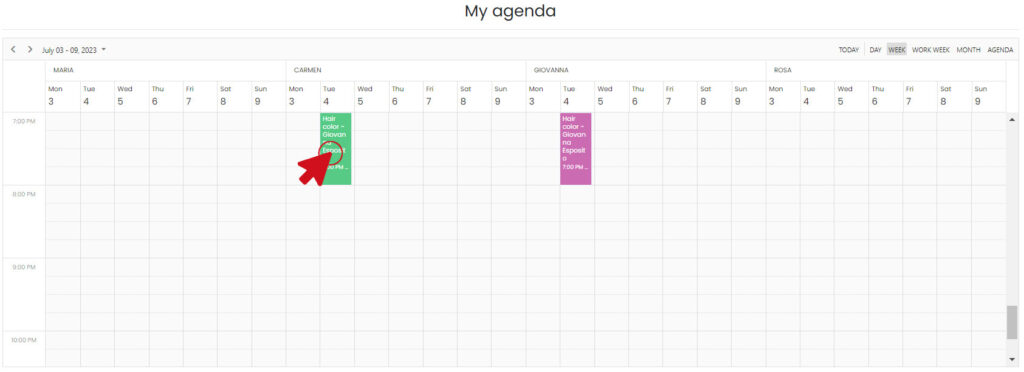
Select appointment in my agenda

While by double clicking on the reservation you can manage the reservation.

Edit Reservation

While the payment for the service can be managed via the “Payments” button
Click Payments

Share This Article :

  • Facebook
  • X
  • LinkedIn
WorkstationExtended Agenda
Table of Contents
  • New Reservation
  • Reservation Management
Help
  • Documentazione
  • Supporto
  • FAQs
  • Mappa del sito
Info
  • Registrati gratis
  • Accedi all'area riservata
  • Privacy e Cookie Policy
  • Termini e condizioni
Social

Trovaci sui social

Facebook-f Instagram Linkedin-in
UAF-9001-2015-Logo
Prenotazioni Cloud

Copyright © 2022 Prenotazioni Cloud by INGIT. All Rights Reserved.

Prenotazioni Cloud
UAF-9001-2015-Logo

Copyright © 2025 Prenotazioni Cloud by INGIT. All Rights Reserved.

Inviaci un messaggio
WhatsApp
Ciao,
come possiamo aiutarti?
Apri la Chat